
Software and app updates released in 2012

It’s the last day of the year, so this is the last CLZ newsletter for 2012.
But before I tell you about our recent releases and current projects…
The entire Collectorz.com team (Robbert, Martin, Rowdy, Sven, AJ, Ronald,
Chris, Pim, Patrick, Syts and Alwin) wishes you a Happy New Year,
with lots of new music, movies, books, comics and video games!
If you all keep growing your collections, we’ll keep providing and improving
the tools to manage it all. Just like we did in 2012, when we brought you:
Read more
 As you probably know, we recently released version NINE of our DVD and Blu-Ray
database software Movie Collector, with new features and a complete new look.
After its launch, we got bombarded with questions from Book Collector users:
“When will you release these improvements for Book Collector?
Please tell me it is coming soon!”
We always aim to please, so we immediately got to work and
I can now announce that Book Collector NINE for Windows is coming soon!
Read more
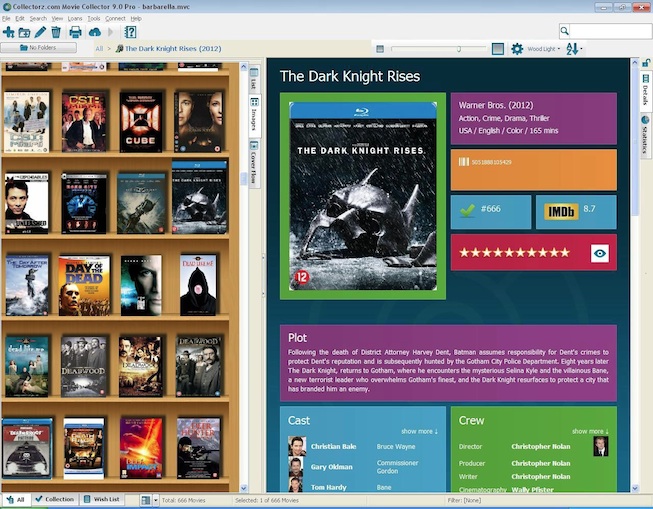
We have just released a major upgrade for Movie Collector for Windows, version NINE.
Version 9 will give you automatic images and IMDb links for actors & directors, full Unicode support, an improved main screen, Core for Movies support, plus a full cosmetic overhaul: Virtual Shelves, new icons, new templates, etc…
Read more
This is Alwin, of Collectorz.com, with the November 2012 Newsletter.
With the recent big updates and more new versions coming up,
it’s pretty hectic at the CLZ headquarters in Amsterdam.
Here’s an overview of what everyone’s working on:
- Ronald, Martin, Rowdy, AJ, Sven and I are finalizing the software and
online movie database for the imminent Movie Collector 9 for Windows. - Robbert and Martin are working together to create and tweak the
new Core for Movies service and the necessary in-house admin tools. - Pim, Patrick, AJ and Chris still got their hands full with our big
iOS two-point-oh project, with the main focus on CLZ Music 2.0 for iOS. - Sytske, Sonny and Chris are answering all support requests and all your
questions related to the recent and upcoming releases.
Now let me go over these projects in more details:
Read more
 A few weeks ago we launched the first part of Core for Movies, Reporting Missing Movies. Today, it is time for part 2:
Report Missing Barcodes
The Report Missing Barcode section of Core lets you add missing barcodes to our movie database, by selecting the movie the barcode belongs to.
How to Report Missing Barcodes?
First, go to the Core for Movies – Missing Barcodes page, and login to your Connect account.
Then, simply follow this three-step process:
Read more
The book and music editions have been live for a while, so now it’s time to do Core for Movies.
Core for Movies is a new system that lets Movie Collector users help each other by improving the quality and completeness of our central online movie database.
And unlike the book and music editions, Core for Movies does not require you to submit the movie data to us. Instead, you only need to report which movies or barcodes are missing or which movies contain data errors. Our content guys Martin and Rowdy will do the work for you 🙂
Today, the first part of Core of Movies was launched: Report missing movies.
Read more
 As you are probably aware, a new major version of
Movie Collector for Windows, version NINE, is coming soon!
Next week, we will start revealing the full feature list, including many
sneak preview screen shots, but *only* to members of our V9 Preview Club.
So this is your last chance to become a member of this V9 Preview club.
Read more
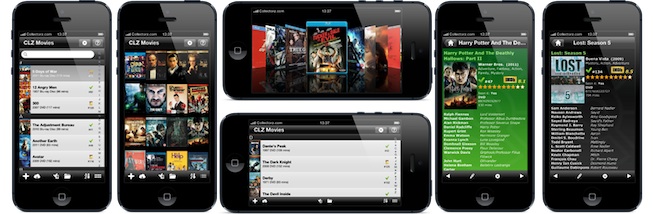
Finally, the big day is here: the new CLZ Movies 2.0 app for iOS is live!
CLZ Movies is now a full movie cataloging app with adding, editing and barcode scanning features, not just a viewer app like the 1.x versions.
Find more information and screen shots on the CLZ.com website.
Read more
This is the October 2012 edition of the Collectorz.com newsletter,
brought to you, as always, by the CLZ head honcho himself, Alwin Hoogerdijk.
You may have guessed from the subject: most of this newsletter is about
two most popular products: Movie Collector and it’s companion app CLZ Movies.
Because that is what all of us have been working on this October:
- Coming soon: Movie Collector 9 for Windows
- Submitted to Apple: CLZ Movies 2.0 for iOS
The other topics today:
- * Windows 8 compatible!
- * A small favor?
Read more
 Now with tiles, touch interface and much more, Windows 8 is a fully re-imagined operating system. So did you upgrade already? Because we sure did!
As a careful user, you might be wondering if your Collectorz.com software works on it? And we’re happy to announce that you have nothing to worry about.
We can confirm that these Collectorz.com programs are working on Windows 8:
- Movie Collector 8
- Book Collector 8
- Music Collector 10
- Comic Collector 5
- Game Collector 5
Read more
We have been working on this in secret for over 2 months now,
so I am happy I can finally bring you the big news:
Movie Collector 9 for Windows is coming soon! ( ETA: December 2012 )
- Martin, Rowdy and Sven have been working on our central online movie database,
to prepare it for 2 very cool V9 features, Sven creating new in-house admin tools,
Martin and Rowdy using the tools to add new V9 specific "content". - Robbert has implemented several improvements to the barcode search engine,
plus a new way to report missing movies, missing barcodes,
broken trailer links and other errors (“Core for Movies”). - Last but not least, Ronald is programming the new features and improvements for the Movie Collector 9 program itself. Some hints:
- The automatic downloading of the new V9 content mentioned above …
- An interface re-design that will make everyone’s life easier …
- A database improvement that many users have been requesting for years …
- Several very nice cosmetic updates to the main screen …
- The integration of Core for Movies …
Read more

Mika Malja from MoviesGamesGadgets.com reviewed Movie Collector for his own DVD collection.
“Some people may wonder why anybody should use a cataloging software because of course everybody knows the names and everything else of their 5 – 10 or in some cases even 20 movies that they own. And if that’s the amount of movies that you own then you definitely don’t need any cataloging software whatsoever.
But sometimes like in my case I have about 1000 movies it’s not that easy anymore to remember all the titles that you own. So when I’m shopping for more I can’t always be 100% sure if I got that bargain bin treasure find already or not. I believe also that this is the most common reason why people do catalogs of their collection. It also saves you money because you don’t accidentally buy any doubles.”
Read his complete review on MoviesGamesGadgets.com.
 Do you own our CLZ Movies app for iPad, iPhone or iPod touch?
Then read on, because this message contains important information on how to
get your free upgrade to the upcoming CLZ Movies 2.0 version.
Here’s the deal:
- CLZ Movies 2.0 is coming soon (ETA: within 2 weeks) and will finally bring
the long awaited adding, editing, barcode scanning and 2-way syncing features. - CLZ Movies 2.0 will be *one* universal app for iPhone and iPad. To be more
precise: the existing iPhone app will be transformed into this universal app.
Read more
Hi all,
This is Alwin, and I have an important question for you.
Today, I want you to tell me if you want further emails from me or not.

You see, I love keeping you all up-to-date with the latest happenings at the
Collectorz.com HQ, with my monthly newsletter email and product specific update emails.
But I absolutely do not want to *annoy* anyone with my emails …
… I want to reach out only to people who like getting these updates.
Read more
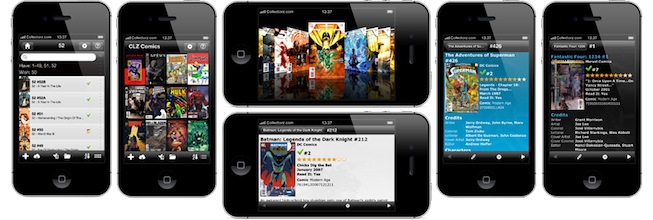
The first Core edition, the one for books, was launched 3 months ago.
And today, it’s time to release the CD edition: Core for Music !
Core for Music is a new system that lets Music Collector users help each other
by improving the quality and completeness of our central online CD database.
It replaces the old “Submit to Collectorz.com” system with a more “quality focused” system and, on top of that, adds a quick way to report errors in our central data.
Important:
To use Core for Music, you need Music Collector 10.1 for Windows (released today). To get it, just use Check for Update in your current version. (Core will be added to the Mac edition later).
Core for Music consist of 3 parts:
Read more
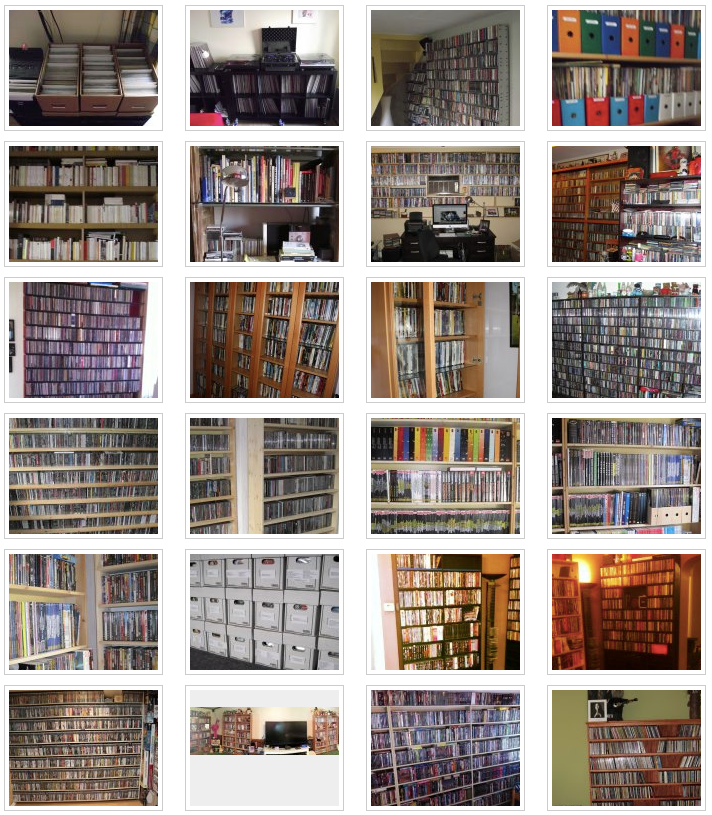
One of the topics in our August 2012 newsletter was how do you store your collection?
Lots of collectors have shared photos of their collections on our Facebook page and we created an album for them.
It is a lot of fun to see all these cabinets and shelving systems full with precious collections and sometimes, proud owners posing in front of them.
Did you know that the most common cabinet used is Ikea’s Billy?
Since the newsletter, lots of Collectorz.com customers proudly shared their collection with us. If you want to show off your collection too, make sure to post your pictures on our fanpage,we share all new photos once per day.
When you’re not on Facebook but want to share your hobby, send your photos to: contact at collectorz dot com.
 Do you own our CLZ Comics app for iPhone or Pad?
Then read on, because this message contains important information on how to
get your free upgrade to the upcoming CLZ Comics 2.0 version.
Here’s the deal:
- CLZ Comics 2.0 is coming soon (ETA: within 2 weeks) and will finally bring
the long awaited adding, editing, barcode scanning and 2-way syncing features. - CLZ Comics 2.0 will be *one* universal app for iPhone and iPad. To be more
precise: the existing iPhone app will be transformed into this universal app.
Read more
We’re currently finalizing CLz Comics 2.0 app and plan to submit it to Apple for approval next week.
So if all goes well, it will be live in an App Store near you within two weeks!
Join the iOS Club!
If you currently own CLZ Comics for iPhone or iPad, make sure to join the Collectorz.com iOS Club.
*Only* club members will receive important information about how to upgrade to version 2.0.
Starting with the upcoming 2.0 versions, our iPhone and iPad apps will be merged into one universal iPhone+iPad app. To be more precise: the existing iPhone apps will be transformed into these universal apps. Which means the current iPad apps will soon become obsolete and will be removed from the App Store.
All owners of the current iPad apps will have to switch to the new 2.0 apps. Full instructions for moving to the new app will be sent *only* to members of the Collectorz.com iOS Club.
Sign up here:
Here’s the August 2012 Collectorz.com Newsletter. With everybody back at the
office after well deserved vacations, work on all projects is speeding up again.
Let’s go over the current projects one by one:
- iOS apps 2.0
- Collectorz.com Core
- Updates for Mac editions
- New Windows project
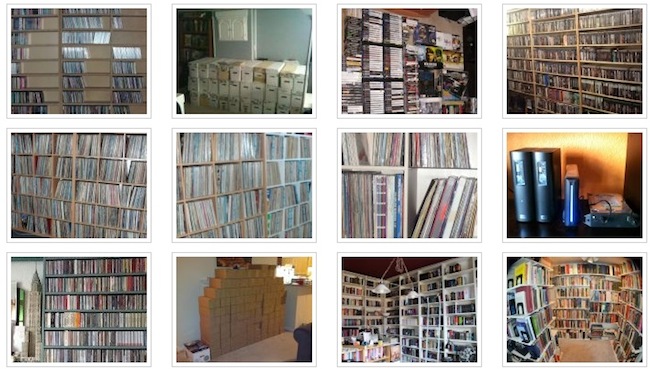
Then at the end of this newsletter, something fun
that kind of evolved on Facebook last week:
- How do you store your collection? -> Collection photos on Facebook
Read more
Two months ago, we introduced Collectorz.com Core for Books.
Core for Books is a new system that lets Book Collector users help each other
by improving the quality and completeness of our central online book database.
Many Book Collector users immediately started using Core. Since the Core launch,
we have already received 4.000 new book entries and 10.000 data submissions.
Now imagine what would happen if *every* Book Collector user would just
ADD the missing books they run into and FIX the data errors they find.
Read more
 Do you own one (or more) of the CLZ apps for iPhone and iPad? Then please read on. Your action is *required* to make sure you don’t miss out.
Here’s a short summary of what’s going to happen:
- Big 2.0 updates for our iOS apps are coming soon. These will be FREE updates.
Main new features: Adding, editing, barcode scanning and 2-way syncing. - 2-way syncing will work through Collectorz.com Connect.
A Sync & Share account (comes free with Pro editions) is sufficient. - With these updates the iPhone and iPad editions will merged into one app.
- CLZ Comics 2.0 is almost ready. ETA: 3 or 4 weeks from now.
The other 4 apps will follow, roughly 4 to 6 weeks apart.
Read more
 Hi all,
Yes, it’s July 31, so it’s time for the Collectorz.com Newsletter.
Today, I have more news about the upcoming new iOS apps, including a
special invitation for all users of our *current* apps for iPhone and iPad:
- Calling all iPhone and iPad users… Get a preview of the 2.0 apps now!
Next to that, an overview of the important releases and happenings this month:
- Updates for Mac editions, now fully Mountain Lion compatible.
- Game Collector 5 for Windows is live!
- C37 scanner overstock (200 units) sold out in 6 days!
- Image server upgraded with 2 TB of extra hard disk space.
Read more